 Sasly Knowledge
Every record.
Found in seconds.
Private search for the documents your organization already holds. On your own server, in English and French.
Preparing for pilot. Demo on request.
Get the highlights.
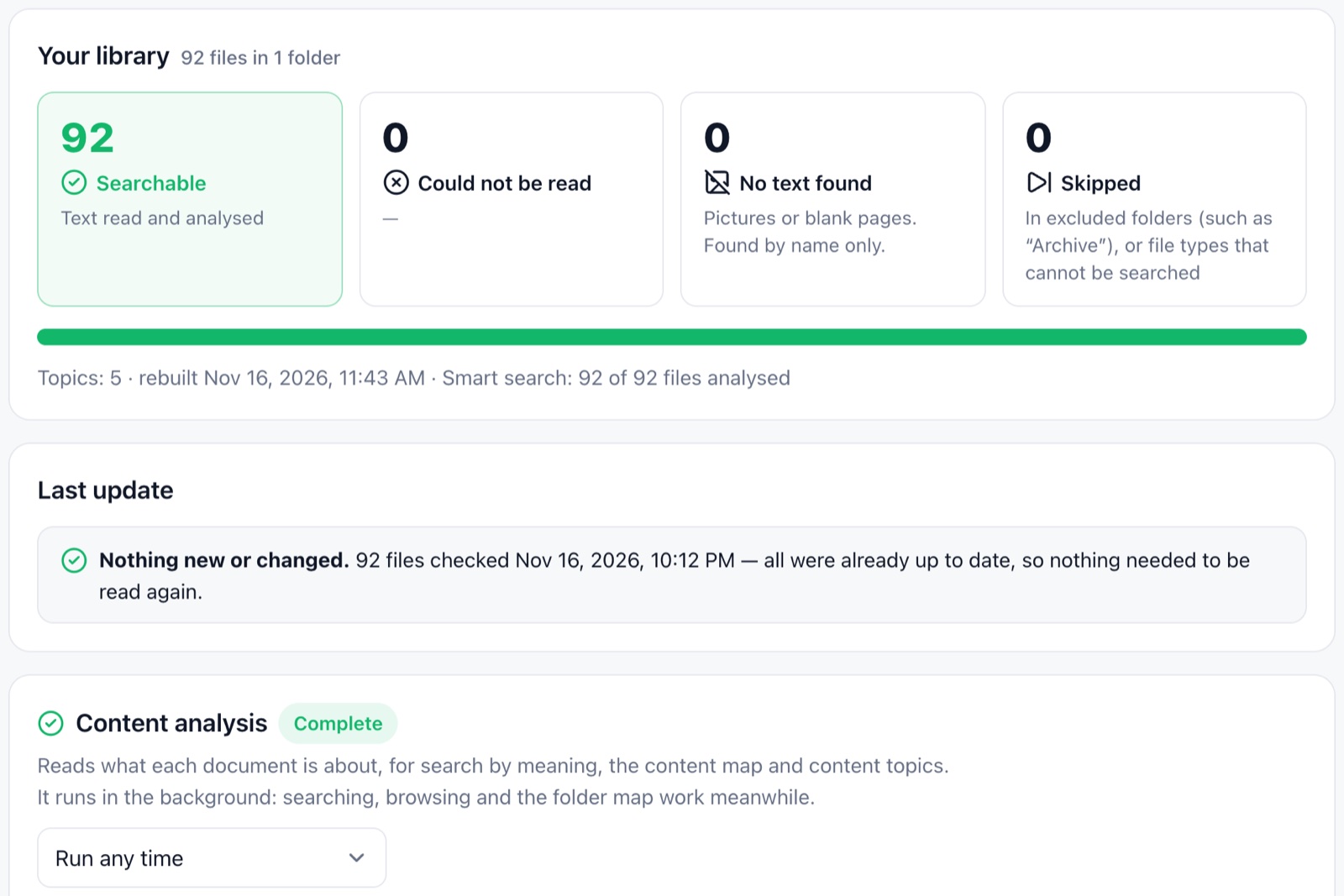
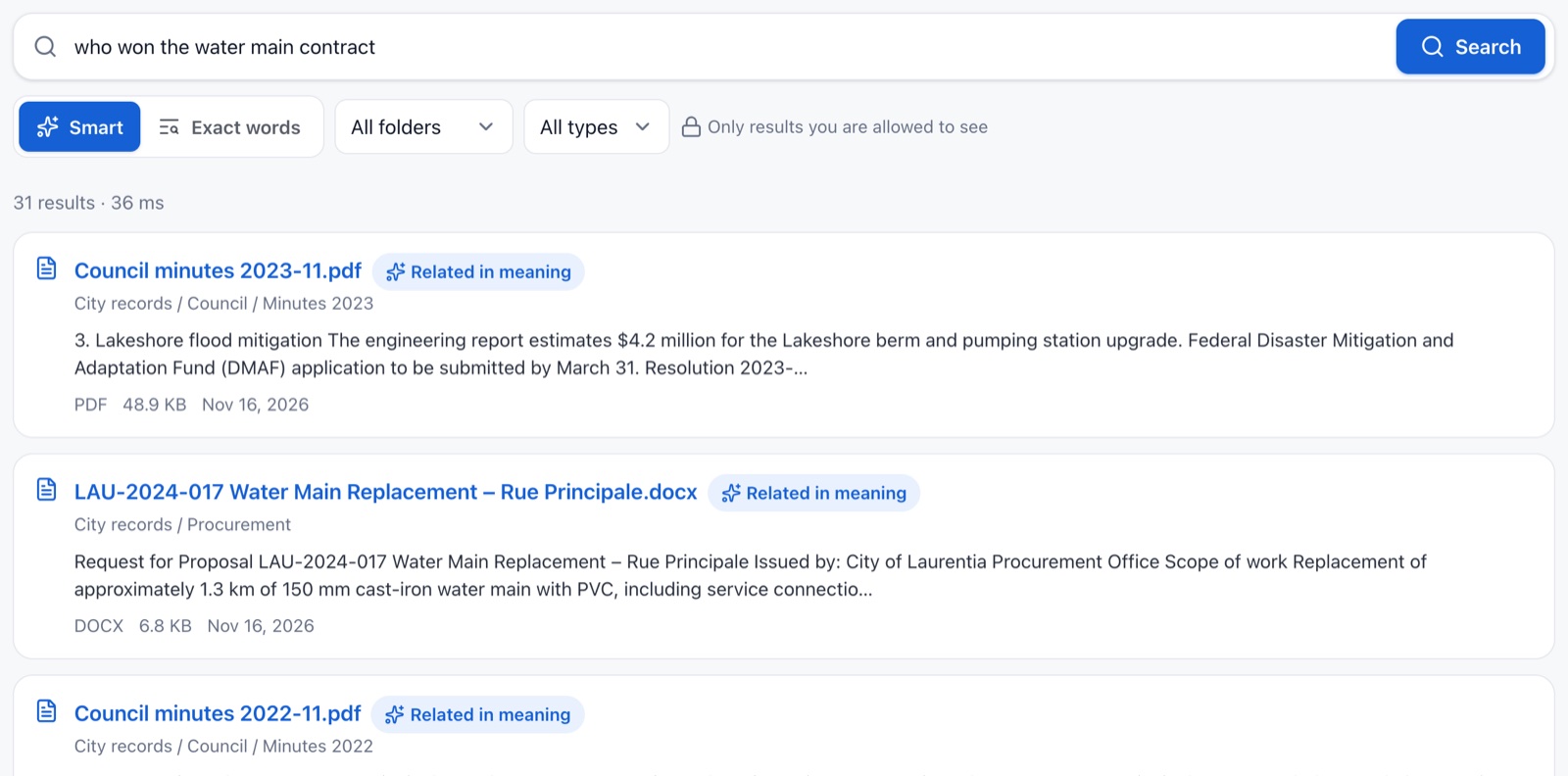
Files stay where they are. The server only reads them, and tells you which ones it could not read.
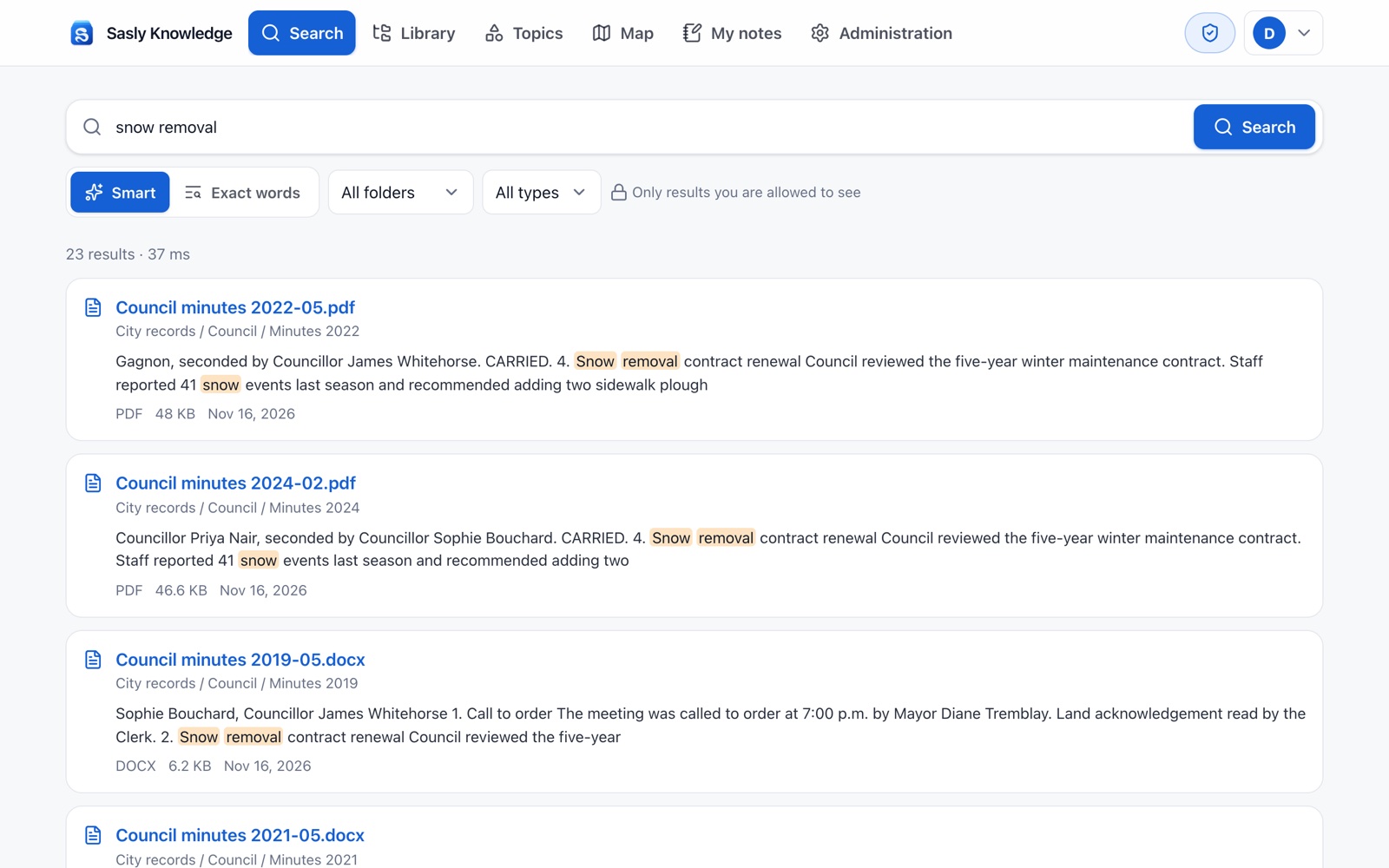
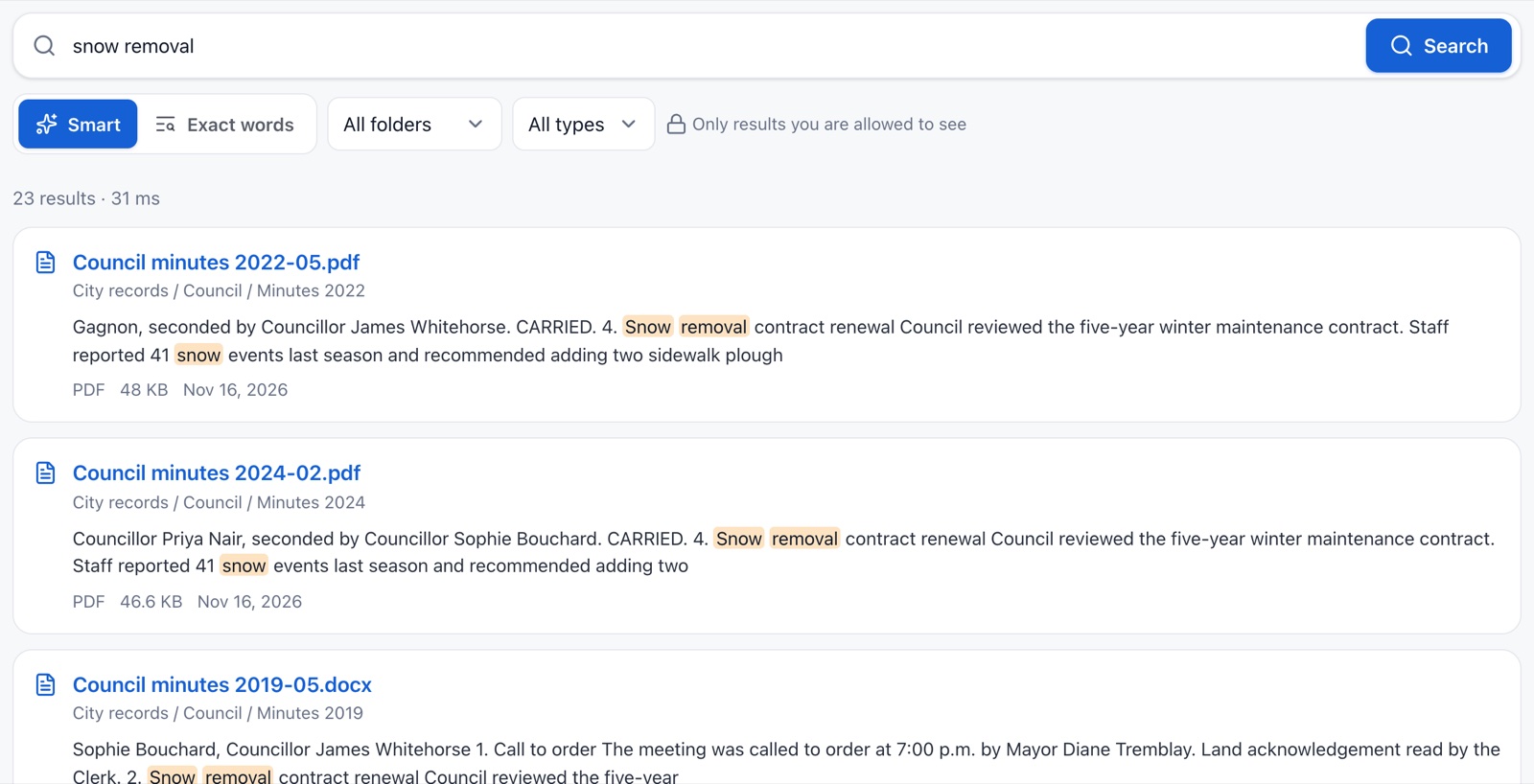
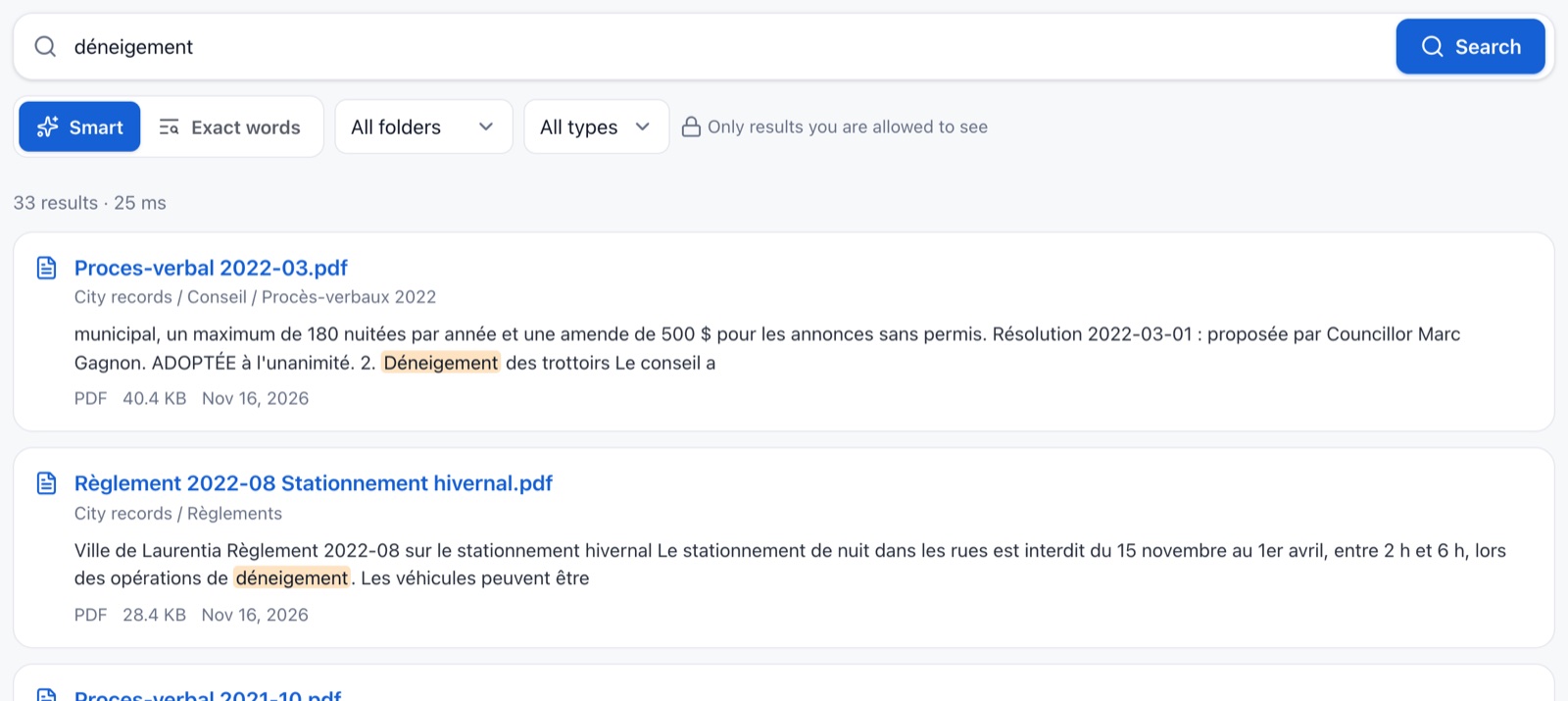
Matched words are highlighted, so people see why a result is there before opening it.
Results found by meaning instead of exact wording are marked “Related in meaning”.
« déneigement » finds procès-verbaux and règlements. Accents and plurals are handled.
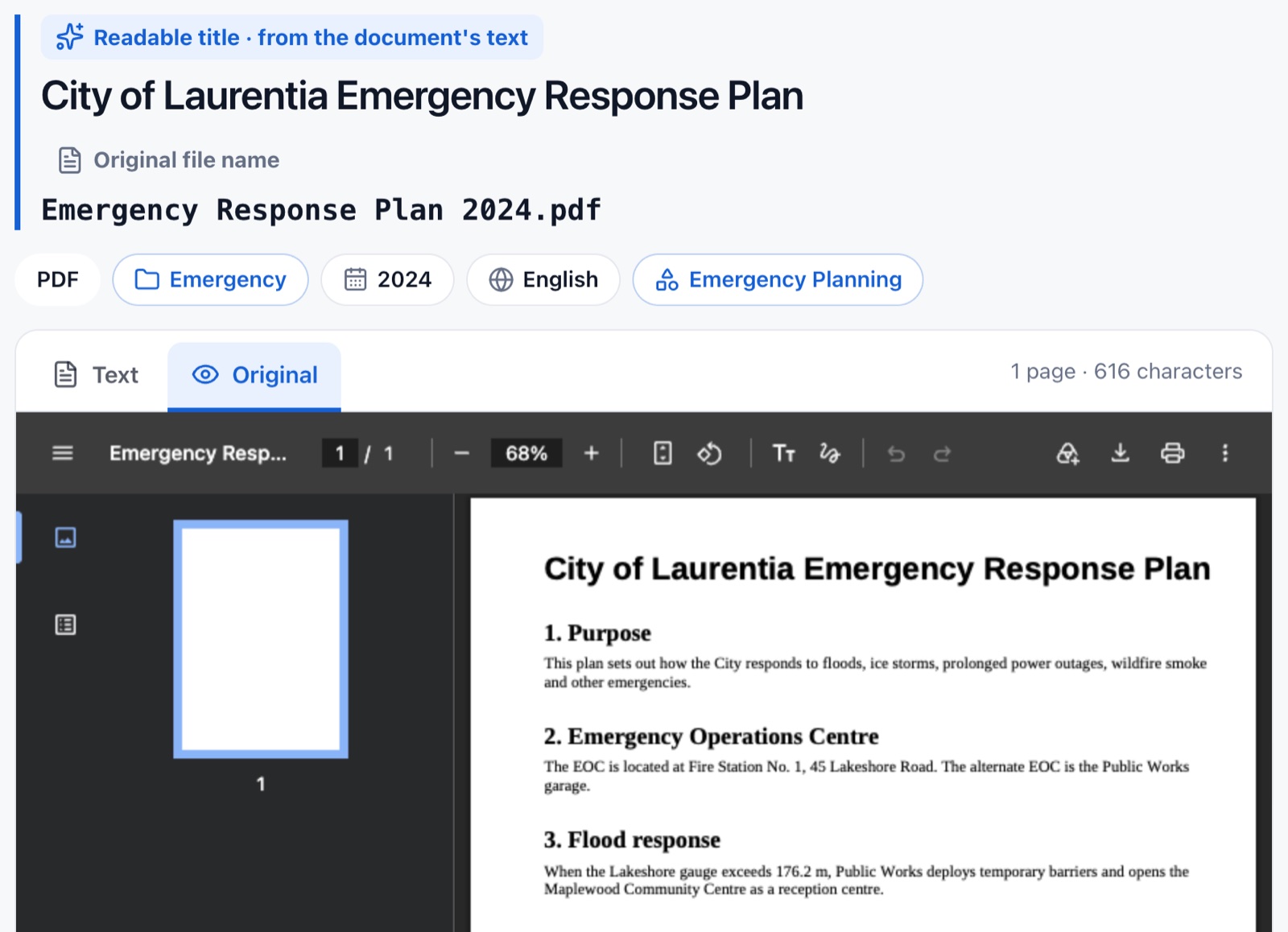
PDF, Word, Excel and PowerPoint open without Office, with the folder path one click away.
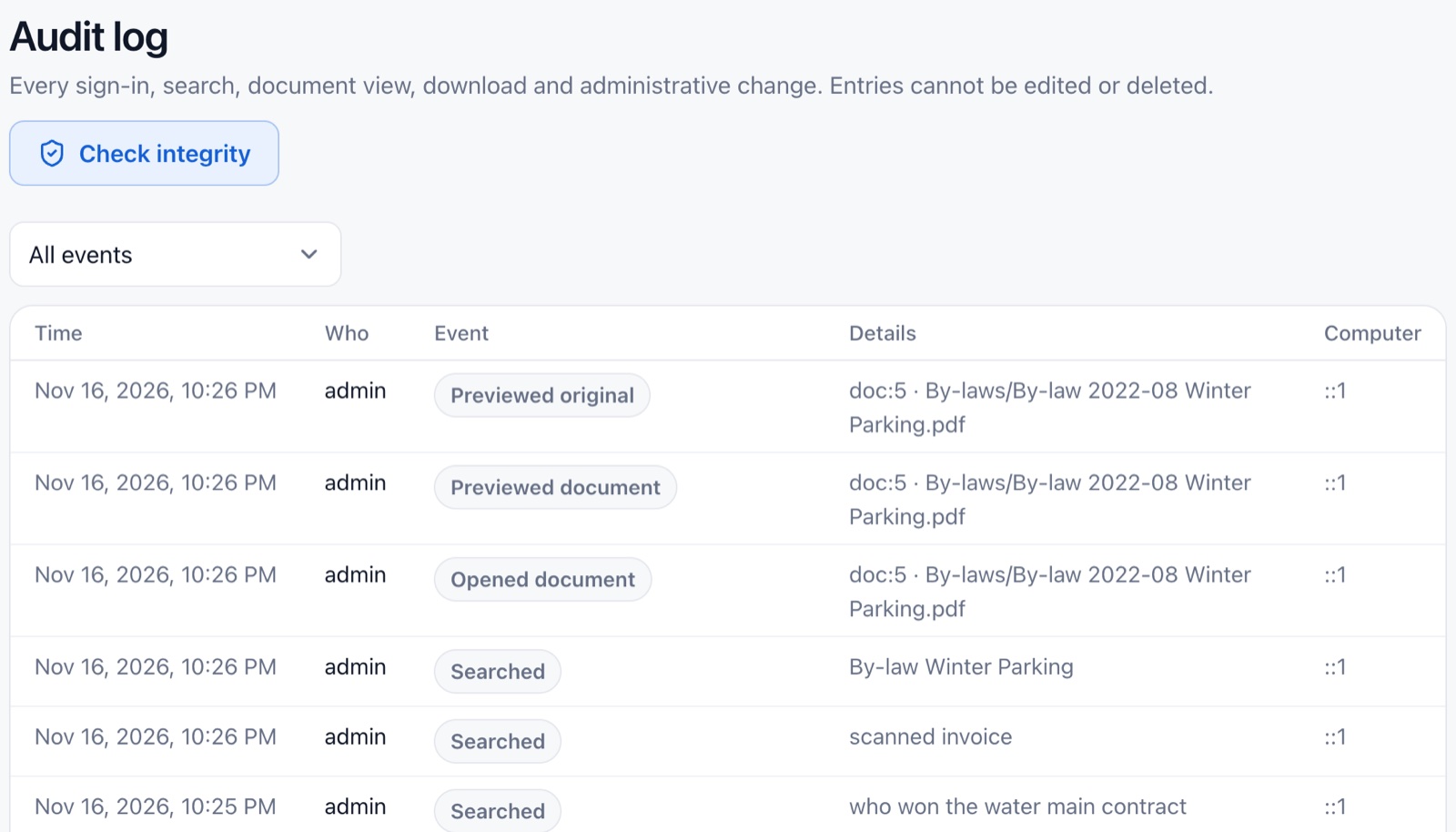
Sign-ins, searches, views and downloads are recorded. Entries cannot be edited or deleted.
Data sovereignty
Your records never leave the building.
Sasly Knowledge runs on a server you own. It reads files where they already are, keeps its index beside them, and runs its AI model on the same machine. No outside provider holds a copy.
0
Nothing sent out.
No documents, searches or AI prompts leave your network when the product runs with its local AI.
Read-only by design.
It never moves, renames or changes a record. Your shared drive stays the system of record.
Custody stays with you.
Records remain in your custody and under your control, the terms Ontario’s freedom of information laws are built on.
No foreign host in the path.
When software runs on your own server, there is no outside host that could receive a legal demand from another country for your records.
Works with no internet.
Search, the library and the local AI keep working when the connection is down. The server does not need the internet to do its job.
Security
Built to be audited.
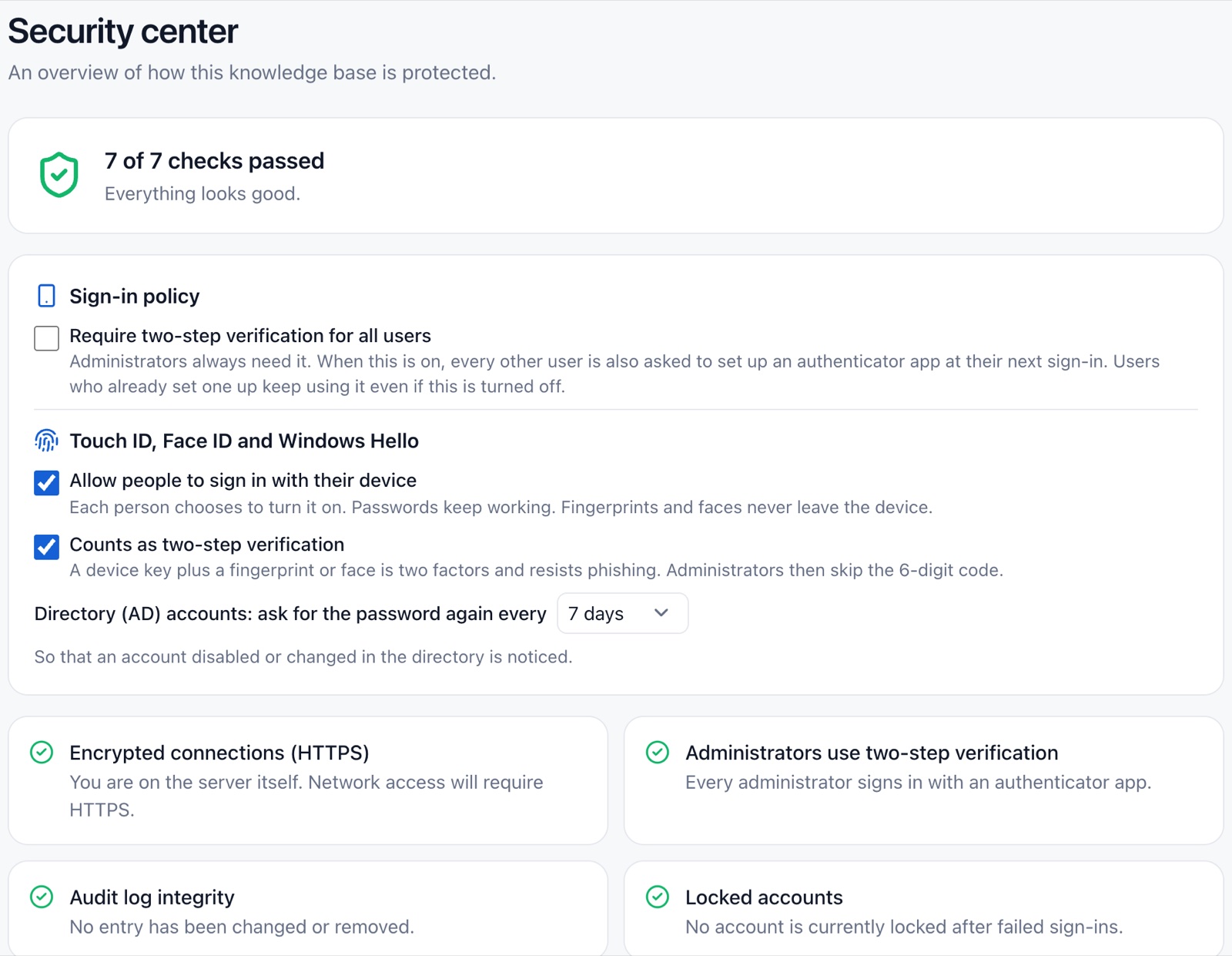
Every search is checked against what that person may see, and every access is written to a log that cannot be edited. One screen tells you whether the server is protected.
A security center, not a settings maze.
Each protection is listed with a plain answer: in place, or not yet.
Permission-aware search.
Results are filtered inside the search itself. A file someone may not see does not appear, not even as a count.
Two-step verification.
Required for administrators, available for everyone, with accounts that lock after repeated failed sign-ins.
A log that shows tampering.
Sign-ins, searches, views, downloads and administrative changes are recorded, and the log can verify its own integrity.
Encrypted connections and backups.
HTTPS with your own certificate, and backups that are encrypted before they are written.
Ontario sets cyber security rules for prescribed public bodies under the Enhancing Digital Security and Trust Act, 2024, including maturity assessments and incident reporting. Whether or not your organization is prescribed today, procurement teams now ask the same questions: where is the data, who can reach it, and what is recorded. Sasly Knowledge is built so that you can answer them. We do not claim compliance on your behalf.
Efficiency
A search instead of a project.
Finding the right file usually means asking the person who filed it. An access-to-information request does not wait while you look. Sasly Knowledge turns locating records into one search across every shared drive.
13–33ms
Faster than you can blink.
Time to search 100,000 files in our own test, by keyword or by meaning.
100,000
Files, on a laptop.
That test ran on a laptop with 16 GB of memory, and every file was read. Your results will depend on your hardware and your files.
English and French, equally.
The interface and the search are both fully bilingual. Accents, plurals and verb forms are handled.
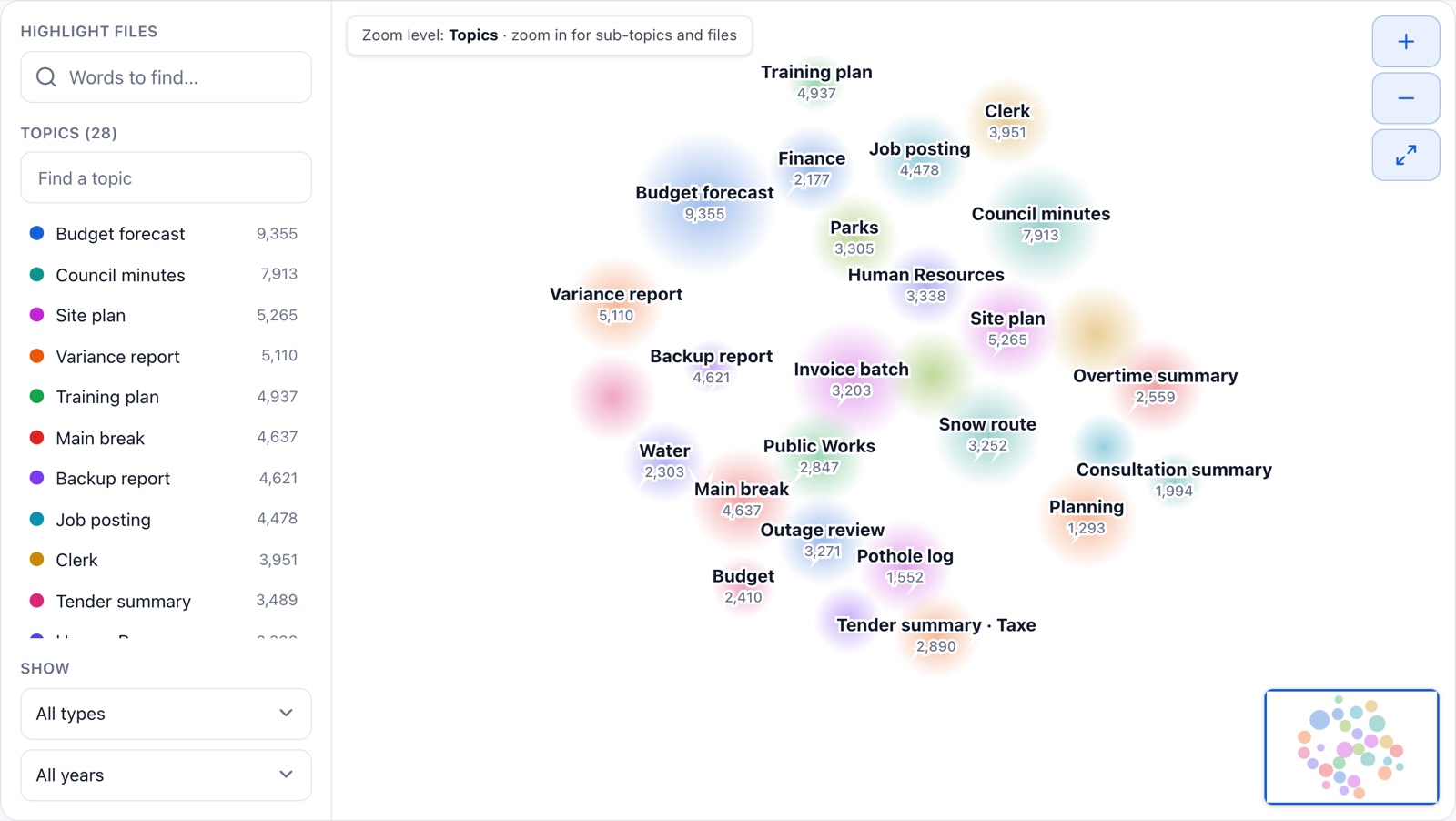
See what a drive really holds.
A map groups documents by subject, so you know what is there before you open a single file.
Scanned paper too.
Built-in text recognition reads scanned PDFs and images.
Open without Office.
PDF, Word, Excel and PowerPoint preview in the browser.
Up to date every night.
New, changed and removed files are picked up automatically.
Cost
Less time looking. Less money running.
The largest cost of records is the time people spend finding them. The second is software that charges per user and per question. Sasly Knowledge is designed to reduce both.
Hours back to your staff.
Locating records for an access request, a council question or a new employee takes one search. The time goes to review and decisions instead.
No per-question AI fees.
The AI model runs on your own server. There is no meter running when staff ask questions.
Ordinary hardware.
Search runs on a standard server. The administration screen tells you whether yours is strong enough for AI answers before you turn them on.
One installer.
One program on the server, with a setup wizard. Nothing to install on staff computers.
No migration project.
Files stay on your shared drives. Departments keep filing the way they do today.
Made for Ontario
Built for the way Ontario public bodies buy.
An Ontario company
SASLab is based in Kitchener, Ontario. Since April 2026, the Buy Ontario directives ask public buyers to give preference to Ontario and Canadian suppliers.
Data on your premises
Nothing is hosted outside your organization unless you decide otherwise.
Bilingual from the start
English and French in every screen, and in the search itself.
Access requests
Locating responsive records for a freedom of information request becomes a search.
Accessibility
Designed and tested toward WCAG 2.2 AA. We do not claim third-party certification.
Support from the people who built it
The team that writes the software answers your questions.
Compare
On your server, or in someone else’s cloud.
| Sasly Knowledge | A typical cloud AI assistant | |
|---|---|---|
| Where your documents sit | On your shared drives, unchanged | Copied to or indexed in the provider’s cloud |
| Where the AI runs | On your server | In the provider’s data centres |
| Who else holds your data | No one | The provider and its subprocessors |
| Cost of AI questions | None beyond your own server | Usually per user, per month |
| When the internet is down | Keeps working | Unavailable |
A general comparison of deployment models, not a review of any specific product. A cloud service can be the right choice for an organization that does not want to run a server.
Tech specs
What it runs on.
- Server
- One program on a server you control. Runs on macOS today. Windows and Linux installers are being completed and tested.
- Staff devices
- A current web browser on a computer, tablet or phone. Light and dark mode.
- File formats
- PDF, Word, Excel, PowerPoint, OpenDocument, Outlook messages, HTML, CSV and text, including legacy .doc files. Scanned PDFs and images through built-in text recognition.
- Languages
- English and French interface and search.
- Sign-in
- Local accounts with two-step verification. Sign-in through Active Directory and Microsoft Entra ID is being tested against live environments.
- Permissions
- Per folder, per department: no access, view only, or view and download.
- AI
- Off by default. When turned on, a local model in a separate process with no network port, reading only what the person asking may read, with cited sources.
- Tested scale
- 100,000 files on a laptop with 16 GB of memory, in our own test.
Working today
- Search by keyword and by meaning, in English and French
- Text extraction from common formats, and from scans
- Library overview, topics and the content map
- Folder permissions by department
- Audit log and security center
- Optional AI answers from a local model
Being completed for version 1.0
- Windows and Linux installers, tested on customer-type machines
- Sign-in against a live Active Directory or Entra ID environment
- A first deployment with a customer’s real records
Questions buyers ask.
Where is our data stored?
On your own server and your existing shared drives. Sasly Knowledge reads files in place and keeps its index on the server you install it on. SASLab does not hold a copy.
Does anything go to the cloud?
Not by default. AI is off until an administrator turns it on, and when it is on the model runs on your server. Any use of an outside AI service would be a setting you choose, for requests you define.
Do we need new hardware?
Search runs on an ordinary server. AI answers need more memory and processing power; the administration screen shows whether your server is suitable before you enable them.
What does it cost?
Pricing is not published yet. We quote per organization after a demonstration, and there is no charge per question asked.
Is it certified?
No. Sasly Knowledge is in development and does not hold security or accessibility certifications. We describe the controls it has, and we will tell you which of your requirements it does not meet yet.
Can we see it before deciding?
Yes. We run a demonstration on a sample library that resembles yours.
See it search a library like yours.
We run the demonstration on sample data, and tell you which of your requirements it meets today.